
AI data engineering, ETL/ELT automation and machine learning
DAXORA Studio is a workspace for preparing enterprise data: connect sources, discover and profile data, generate pipelines that engineers review, validate quality and build predictive models.
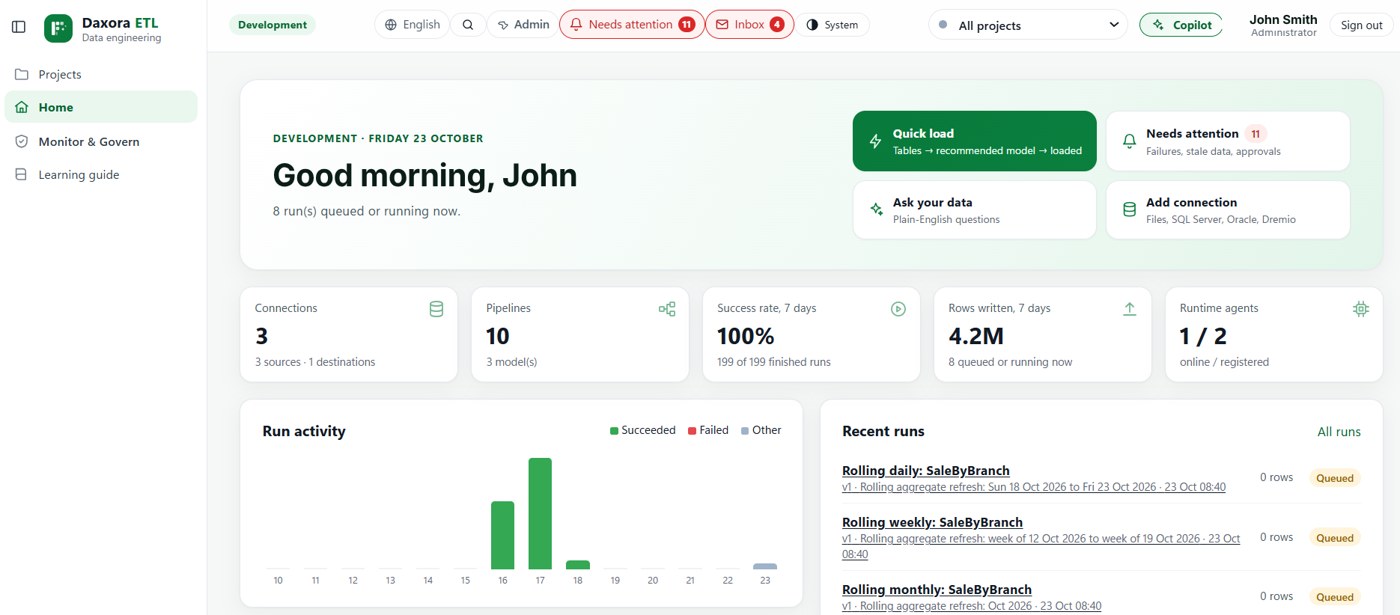
What is DAXORA Studio?
DAXORA Studio is an enterprise data engineering and machine learning workspace. It connects to databases, files and APIs, discovers and profiles the data, generates ETL/ELT pipelines for engineers to review, validates data quality and trains predictive models in one place.
Studio is one of three DAXORA platforms. Studio prepares and models data, DAXORA Insight turns data into dashboards, reports and answers, and DAXORA Forge generates native BI reports and converts supported BI assets. Each can be used on its own.
What Studio does
- AI-assisted data discovery: Scans databases, files and APIs and lists what is available.
- Data profiling and relationship detection: Profiles columns and suggests keys and joins.
- ETL/ELT pipeline generation: Proposes pipelines that engineers review and approve.
- Visual transformation designer: Build cleansing, joins and aggregations on a visual canvas.
- Workflow scheduling and monitoring: Run on schedules and track status and failures.
- Data quality validation: Check completeness and consistency before data is used.
- Machine learning and AutoML: Train and compare models with guided selection.
- Predictive analytics: Apply models to new data for predictions and forecasts.
- Enterprise connectivity: Connect to the databases, files and cloud sources you already use.
How a Studio project works
- Connect sources. Point Studio at databases, files and APIs, using the access your organization approves.
- Discover and profile. Studio lists what is available, profiles columns and suggests keys and joins.
- Generate and review pipelines. AI proposes ETL/ELT pipelines on a visual canvas. Engineers review, edit and approve them before anything runs.
- Validate quality. Define rules, for example that a key must not be empty, and evaluate them before data is loaded.
- Schedule and monitor. Run pipelines on a schedule and track status and failures.
- Build predictive models. Prepare features, train and compare models with guided AutoML, then apply them to new data.
When Studio is a good fit
- Teams repeat manual ETL work for similar sources and want a reviewed starting point instead of a blank canvas.
- Data arrives from several databases, files and APIs and needs consistent preparation and validation.
- Predictive models should be built next to the pipelines that feed them, under the same review process.
- Governance requires a person to approve AI-generated work before it runs.
Questions to ask when evaluating AI ETL tools
These questions apply to any AI-assisted ETL product, including this one.
- Can engineers see, edit and reject every step the AI generates?
- Which sources and targets are validated for your technology stack, and in which versions?
- How are data quality rules defined, evaluated and evidenced?
- Where does the platform run, and where does your data go?
- How are predictive models validated before they are used for decisions?
Transparency
Frequently asked questions
What is DAXORA Studio?
DAXORA Studio is an enterprise data engineering and machine learning workspace. It connects to data sources, discovers and profiles data, generates ETL/ELT pipelines for engineers to review, validates data quality and builds predictive models.
Does Studio replace data engineers?
No. Studio proposes pipelines and transformations. Engineers review, edit and approve them before anything runs.
Which data sources does Studio connect to?
Studio is designed to connect to databases, files and APIs. The list of validated connectors for your environment is confirmed with DAXORA during a demo; see the platform and feature compatibility page for the current status.
Can I use this platform without the other DAXORA products?
Yes. DAXORA Studio, DAXORA Insight and DAXORA Forge can each be used on its own. Insight and Forge do not require Studio.
Are the demonstrations on this website live?
No. The animations and interface previews on this website are simulated with sample data to show the kind of result each platform produces. They are not product screenshots and do not show a customer's data.
Related pages
See DAXORA Studio, Insight and Forge with your own use case
Tell us where your data lives and what decisions you need to support. We will show you how the platforms apply.